Genomics & transcriptomics
Nayancode Read Counting & Peak Calling
Count genes and call peaks, on your own computer.
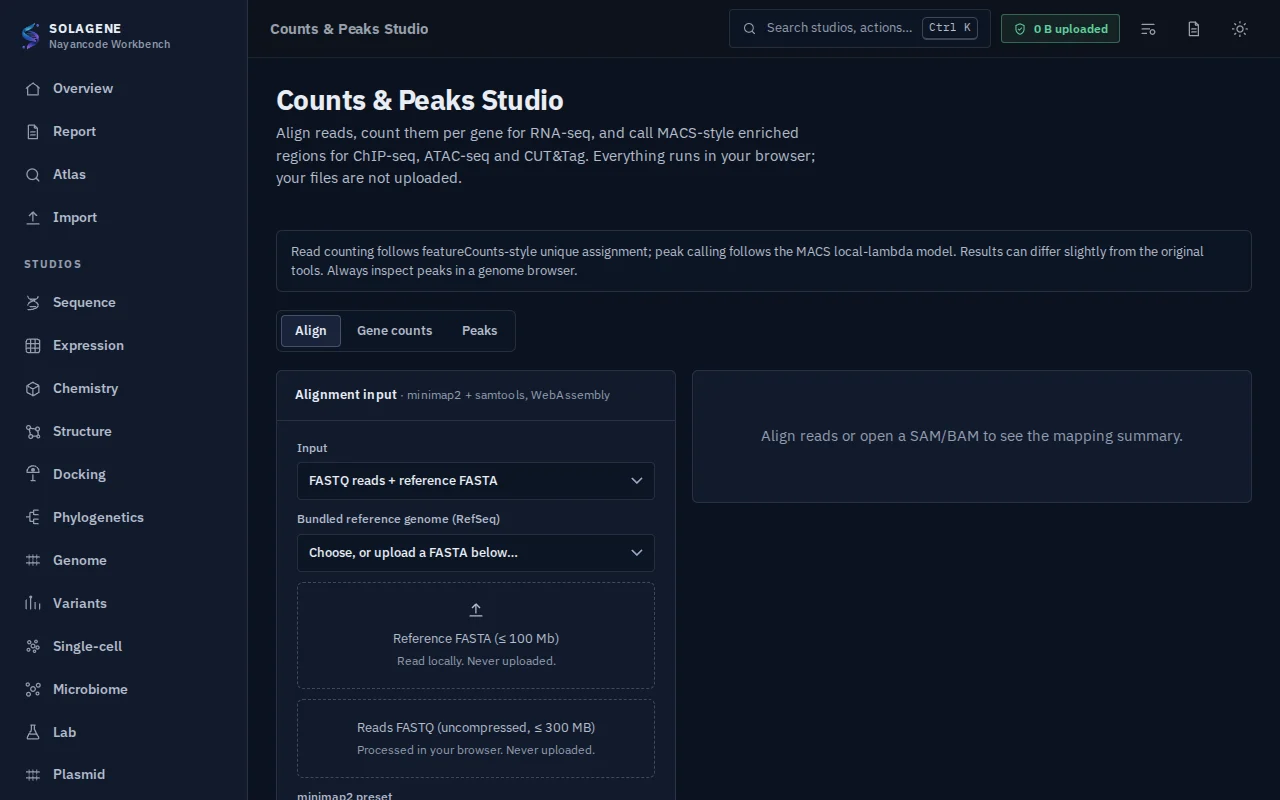
Minimap2 alignment in WebAssembly, featureCounts-style gene counts and TPM, and MACS-style peak calling from SAM/BAM or FASTQ.
Free · your files are not uploaded
Overview
What Read Counting & Peak Calling does
Read Counting & Peak Calling aligns FASTQ with minimap2 compiled to WebAssembly and sorts and indexes it with samtools, or opens an existing SAM/BAM alignment. Its counting engine assigns reads uniquely to merged-exon gene models with strandedness, MAPQ and overlap filters, computes merged exon-union lengths and TPM, and exports a count matrix that can be handed to the RNA-seq Expression.
For ChIP-seq, ATAC-seq and CUT&Tag it estimates fragment size by strand cross-correlation, builds fragment coverage, estimates a local lambda, tests with a Poisson model and Benjamini-Hochberg correction, merges nearby calls and writes narrowPeak-style BED and bedGraph files. A synthetic two-sample library and a ten-megabase peak demo are bundled so both tabs can be tried immediately.
Technical specifications
- Inputs
- FASTQ reads + reference FASTA, or an existing SAM/BAM alignment · GFF3 or GTF annotation (or a bundled RefSeq GFF3) · Treatment and optional control SAM/BAM for peak calling · SYNTHETIC demos: 20 genes on 100 kb, and 3 planted peaks on 10 Mb
- Outputs
- Gene count matrix and TPM · Alignment summaries · narrowPeak-style BED and bedGraph · Peak coverage plot and CSV
- Engine
- minimap2 and samtools (WebAssembly, MIT) + TypeScript counting and peak-calling kernels in a Web Worker
- Platforms
- Chrome, Edge, Firefox and Safari (current versions) · Windows, macOS, Linux and ChromeOS · No installation and no upload; free account for the Workbench
- Limits
- Reference ≤ ~100 Mb and FASTQ ≤ 300 MB in the browser; BAM input ≤ 500 MB; peaks on contigs ≤ 50 Mb. Paired-end data is counted once (read 1). MACS-style results can differ from MACS; inspect peaks in a genome browser. Research-grade, not clinical. Runs in your browser.
- Licence
- Free plan for study and academic research (free account); Lab, Institution and cloud-compute plans for business
Features
Capabilities
Alignment in the browser
minimap2 and samtools in WebAssembly, or load an existing SAM/BAM file.
Gene counts
Unique assignment to merged-exon genes with strandedness, MAPQ and overlap filters.
TPM and export
Merged exon-union length, TPM and a count-matrix CSV with an RNA-seq Expression hand-off.
MACS-style peaks
Strand cross-correlation fragment size, local lambda, Poisson p-values and BH FDR.
Peak output
narrowPeak-style BED, bedGraph coverage and a coverage plot with called intervals.
Synthetic demos
20 genes on 100 kb for counting, and three planted peaks on 10 Mb for peak calling.
Use cases
Who uses it, and for what
- Counting RNA-seq reads per gene without a server
- Calling peaks from a small ATAC-seq BAM
- Teaching what a MACS model actually does
- Checking a count matrix before differential expression
Documentation
Quick start
Open Read Counting & Peak Calling
Use the button on this page or the Workbench menu. Nothing to install; works in current Chrome, Edge, Firefox and Safari.
Load data or the demo
Drop in your files (FASTQ reads + reference FASTA, or an existing SAM/BAM alignment, GFF3 or GTF annotation (or a bundled RefSeq GFF3), Treatment and optional control SAM/BAM for peak calling) or load the labelled synthetic demo to explore safely.
Run and inspect
Results appear as interactive figures and tables; each analysis records its parameters and versions.
Export and cite
Export figures and tables, add them to a report, and copy the auto-written methods paragraph.
Learn the methods with Vedicgen
Courses that use Read Counting & Peak Calling
Talk to us
Request a demo or ask a question
For classroom use, self-hosted deployments, custom apps or support. We reply within two working days.
Free: Free
Lab: From ₹4,999 per month, billed yearly (US$119 outside India)
Institution: Quoted
Cloud compute & analysis: Quoted