Chemistry & structure
Nayancode Pharmacokinetics
Non-compartmental analysis and compartment models in a browser tab.
PK from a concentration–time table: NCA with AUC, λz, half-life, clearance and MRT, one- and two-compartment simulation and multiple-dose steady state.
Free · your files are not uploaded
Overview
What Pharmacokinetics does
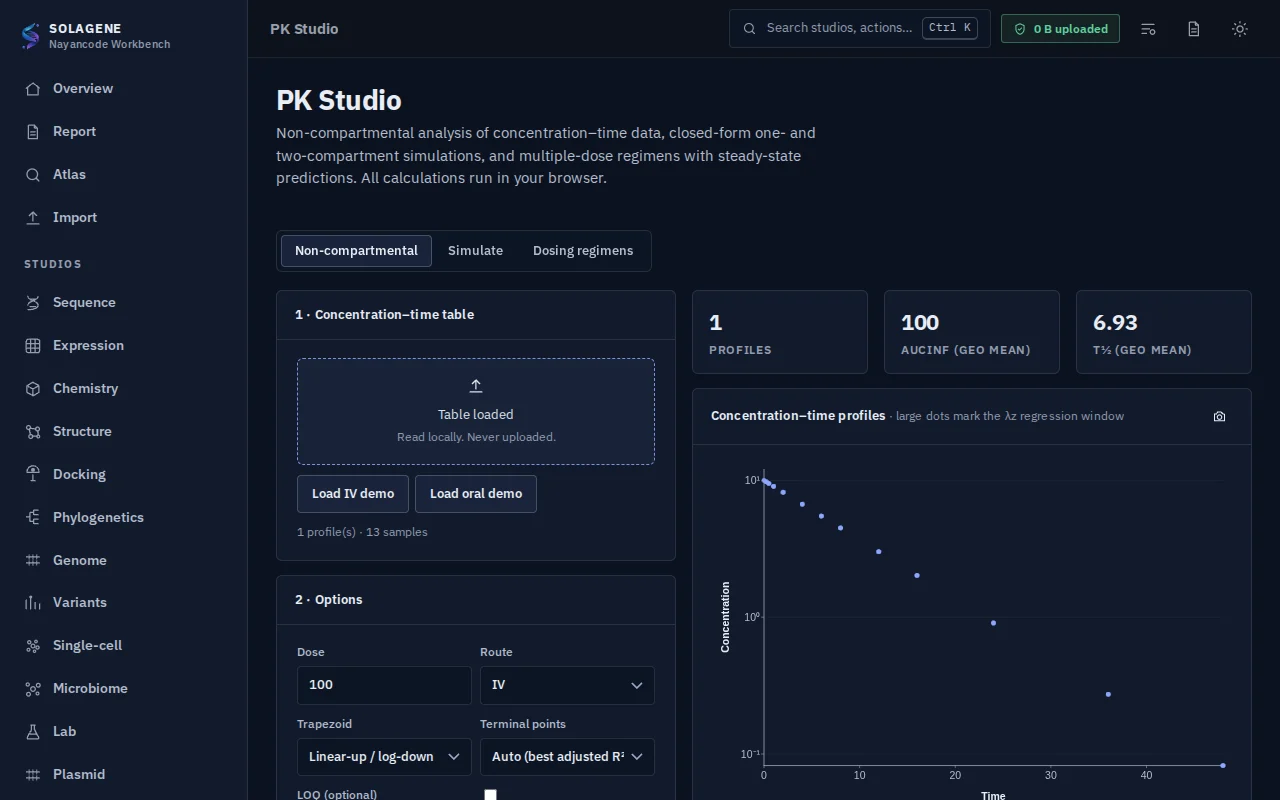
Pharmacokinetics starts from the table you already have. Dose, route and a concentration–time series give AUClast and AUCinf by linear-up/log-down trapezoids, the terminal slope λz with its own selection and fit statistics, half-life, clearance, volume of distribution and mean residence time, in one parameter table.
The same app simulates: one- and two-compartment profiles, multiple-dose superposition with accumulation and troughs at steady state, and a loading-dose calculation for a regimen you can write straight into a protocol. It is an educational and research tool rather than a validated clinical pharmacology package, and its limits are stated on the page — non-compartmental analysis depends on how you sampled, and superposition assumes linear kinetics.
Technical specifications
- Inputs
- Concentration–time CSV/TSV · Dose and route · Model parameters
- Outputs
- NCA parameter table · Concentration–time curves · Steady-state predictions · Regimen calculations
- Engine
- TypeScript
- Platforms
- Chrome, Edge, Firefox and Safari (current versions) · Windows, macOS, Linux and ChromeOS · No installation and no upload; free account for the Workbench
- Limits
- Educational/research tool; not a validated clinical pharmacology package. NCA depends on sampling. Superposition assumes linear PK.
- Licence
- Free plan for study and academic research (free account); Lab, Institution and cloud-compute plans for business
Features
Capabilities
Non-compartmental analysis
AUClast, AUCinf, AUMC, λz, t½, clearance, Vz and MRT from a concentration–time CSV.
Terminal-phase selection
λz chosen over the window that fits best, with the adjusted R² shown.
Compartment models
One- and two-compartment profiles from dose and parameters, IV or extravascular.
Multiple dosing
Superposition with accumulation ratio, steady-state peaks, troughs and loading dose.
Semi-log figures
Curves and residuals plotted on log axes, exported as SVG, PDF or PNG.
Use cases
Who uses it, and for what
- Reading a PK parameter table from preclinical samples
- Planning a dose interval before a study
- Teaching one- and two-compartment kinetics
- Checking a simulation against reported parameters
Documentation
Quick start
Open Pharmacokinetics
Use the button on this page or the Workbench menu. Nothing to install; works in current Chrome, Edge, Firefox and Safari.
Load data or the demo
Drop in your files (Concentration–time CSV/TSV, Dose and route, Model parameters) or load the labelled synthetic demo to explore safely.
Run and inspect
Results appear as interactive figures and tables; each analysis records its parameters and versions.
Export and cite
Export figures and tables, add them to a report, and copy the auto-written methods paragraph.
Learn the methods with Vedicgen
Courses that use Pharmacokinetics
Talk to us
Request a demo or ask a question
For classroom use, self-hosted deployments, custom apps or support. We reply within two working days.
Free: Free
Lab: From ₹4,999 per month, billed yearly (US$119 outside India)
Institution: Quoted
Cloud compute & analysis: Quoted