Genomics & transcriptomics
Nayancode Sanger Trace Analysis
Read the trace, trim the mess and compare with the reference.
ABIF trace viewer with quality bars and mixed-peak calls, Mott or window trimming, FASTA/FASTQ export, and both-orientation comparison with a reference.
Free · your files are not uploaded
Overview
What Sanger Trace Analysis does
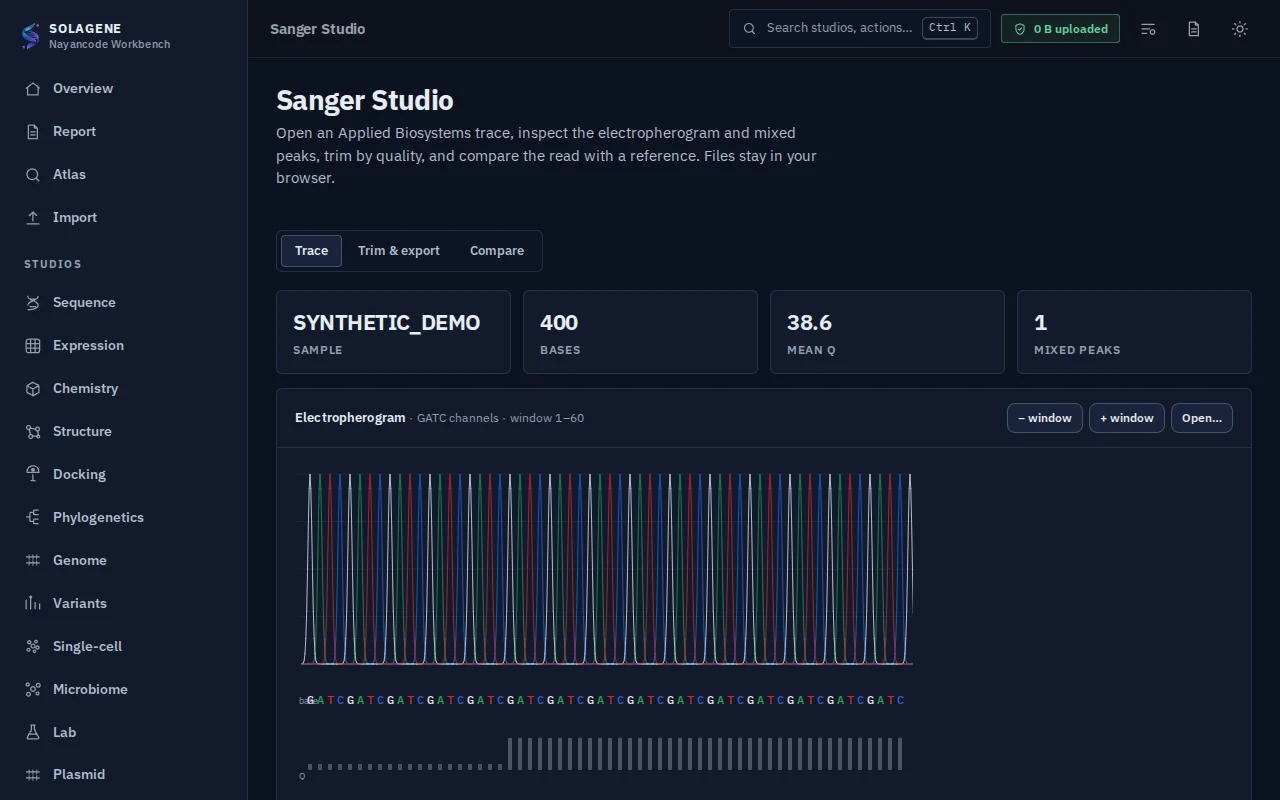
Sanger Trace Analysis opens Applied Biosystems .ab1/.abi traces and draws the electropherogram with base letters and quality bars. Mixed peaks are called with IUPAC codes, so a heterozygous position is visible in the trace rather than hidden in a consensus.
Quality trimming uses Mott or a window mean, and the same kept range is shared with the comparison tab. A read can be aligned to a pasted reference in both orientations, with differences reported alongside the read quality. Base calls and qualities remain the instrument software’s; the viewer does not call bases.
Technical specifications
- Inputs
- Applied Biosystems .ab1 / .abi trace · Reference FASTA for comparison
- Outputs
- Electropherogram · Trimmed FASTA and FASTQ · Difference table with quality · CSV export
- Engine
- TypeScript kernels; SVG trace viewer
- Platforms
- Chrome, Edge, Firefox and Safari (current versions) · Windows, macOS, Linux and ChromeOS · No installation and no upload; free account for the Workbench
- Limits
- Base calls and qualities are the instrument software’s; the viewer does not call bases. Local alignment is not a validated variant caller, so confirm every difference on the trace or the opposite strand
- Licence
- Free plan for study and academic research (free account); Lab, Institution and cloud-compute plans for business
Features
Capabilities
Trace viewer
Four-colour electropherogram with bases and quality bars.
Mixed peaks
IUPAC calls where two peaks share a position.
Quality trimming
Mott or window mean, with the kept range shown.
Export
Trimmed or full FASTA, plus FASTQ with Phred+33 qualities.
Reference comparison
Both-orientation local alignment and a difference table with quality.
Use cases
Who uses it, and for what
- Checking a Sanger read after cloning
- Trimming low-quality ends before BLAST
- Confirming a heterozygous variant on the trace
- Comparing a read with an expected reference
Documentation
Quick start
Open Sanger Trace Analysis
Use the button on this page or the Workbench menu. Nothing to install; works in current Chrome, Edge, Firefox and Safari.
Load data or the demo
Drop in your files (Applied Biosystems .ab1 / .abi trace, Reference FASTA for comparison) or load the labelled synthetic demo to explore safely.
Run and inspect
Results appear as interactive figures and tables; each analysis records its parameters and versions.
Export and cite
Export figures and tables, add them to a report, and copy the auto-written methods paragraph.
Learn the methods with Vedicgen
Courses that use Sanger Trace Analysis
Talk to us
Request a demo or ask a question
For classroom use, self-hosted deployments, custom apps or support. We reply within two working days.
Free: Free
Lab: From ₹4,999 per month, billed yearly (US$119 outside India)
Institution: Quoted
Cloud compute & analysis: Quoted