Chemistry & structure
Nayancode Molecular Dynamics
A fluid on your GPU, a protein folding in your browser.
Lennard-Jones molecular dynamics on your GPU or CPU, a C-alpha Go-model folder, and all-atom GROMACS MD through the Nayancode Bridge.
Free · your files are not uploaded
All-atom MD runs on your computer through the Nayancode Bridge.
Overview
What Molecular Dynamics does
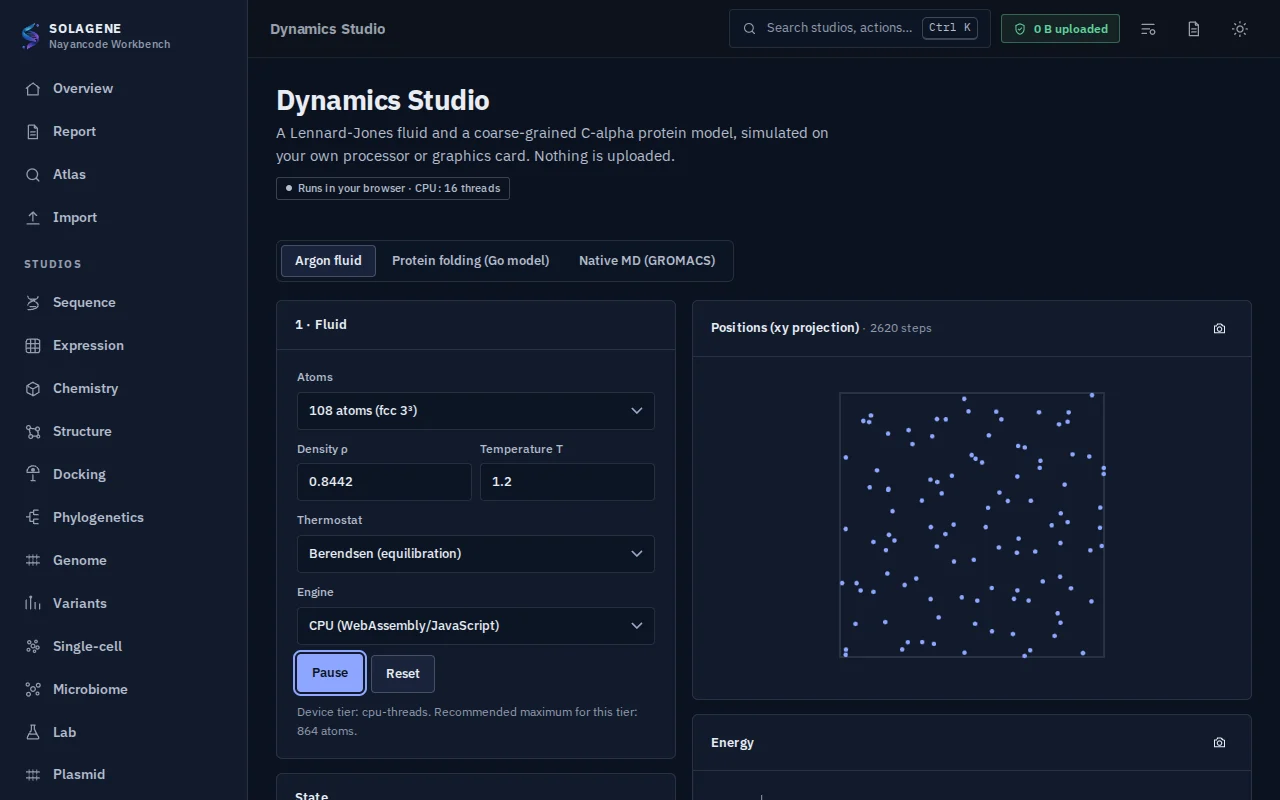
Molecular Dynamics runs two simulation engines in the browser. The Lennard-Jones fluid uses velocity-Verlet integration with cell lists, a WebGPU all-pairs force kernel and a CPU twin that returns the same physics, with kinetic, potential and total energy, temperature and pressure traces. The Go model folds a coarse-grained protein from a PDB structure with bond, angle, dihedral, native-contact and repulsion terms, integrated with BAOAB Langevin dynamics and reported through Q, RMSD and Rg.
All-atom molecular dynamics with GROMACS runs on your own computer through the Nayancode Bridge, a small program you start yourself. The page inspects your installed GROMACS build and your GPUs, chooses flags that match the vendor you actually have, and streams the step-by-step log back to the browser. Nothing is sent to Solagene.
Technical specifications
- Inputs
- Built-in fcc fluid (108 to 2048 atoms) · PDB structure for the C-alpha Go model · Bundled 1UBQ and 1PGA demos, or a PDB ID from RCSB on click
- Outputs
- Energy, temperature and pressure traces · PDB trajectories and CSV · Folding observables (Q, RMSD, Rg) · GROMACS EM, NVT, NPT and production results
- Engine
- TypeScript (Float64) and WebGPU (f32) kernels; folding runs in a Web Worker
- Platforms
- Chrome, Edge, Firefox and Safari (current versions) · Windows, macOS, Linux and ChromeOS · No installation and no upload; free account for the Workbench
- Limits
- Educational and research-grade engines. The fluid uses reduced units and the Go model is a structure-based toy model of one known fold, not a force field for structure or binding prediction, and not all-atom production MD. Runs in your browser; uses your GPU through WebGPU when available. All-atom MD runs on your own computer through the Nayancode Bridge.
- Licence
- Free plan for study and academic research (free account); Lab, Institution and cloud-compute plans for business
Features
Capabilities
GPU Lennard-Jones engine
WebGPU force kernel with a CPU twin and a parity check, batched within your device limits.
Thermostat and traces
Berendsen thermostat, cell lists, and kinetic, potential, total energy, temperature and pressure traces.
Go-model folding
C-alpha structure-based model with native contacts, BAOAB Langevin integration, Q, RMSD and Rg.
Folding scans
Temperature scans and multi-model PDB trajectory export.
All-atom MD on your computer
GROMACS energy minimisation, NVT, NPT and production through the Bridge, with GPU flags chosen from the installed build and detected hardware.
Bundled demos
fcc fluid, 1UBQ and 1PGA Go-model fixtures, and a quick 1UBQ GROMACS run.
Use cases
Who uses it, and for what
- Teaching molecular dynamics with a real integrator
- Seeing a coarse-grained protein fold
- Comparing GPU and CPU results on the same input
- Running a first GROMACS job without a cluster
Documentation
Quick start
Open Molecular Dynamics
Use the button on this page or the Workbench menu. Nothing to install; works in current Chrome, Edge, Firefox and Safari.
Load data or the demo
Drop in your files (Built-in fcc fluid (108 to 2048 atoms), PDB structure for the C-alpha Go model, Bundled 1UBQ and 1PGA demos, or a PDB ID from RCSB on click) or load the labelled synthetic demo to explore safely.
Run and inspect
Results appear as interactive figures and tables; each analysis records its parameters and versions.
Export and cite
Export figures and tables, add them to a report, and copy the auto-written methods paragraph.
Learn the methods with Vedicgen
Courses that use Molecular Dynamics
Talk to us
Request a demo or ask a question
For classroom use, self-hosted deployments, custom apps or support. We reply within two working days.
Free: Free
Lab: From ₹4,999 per month, billed yearly (US$119 outside India)
Institution: Quoted
Cloud compute & analysis: Quoted