Genomics & transcriptomics
Nayancode Primer Design
Design a pair, predict the amplicon and check the dimers before you order.
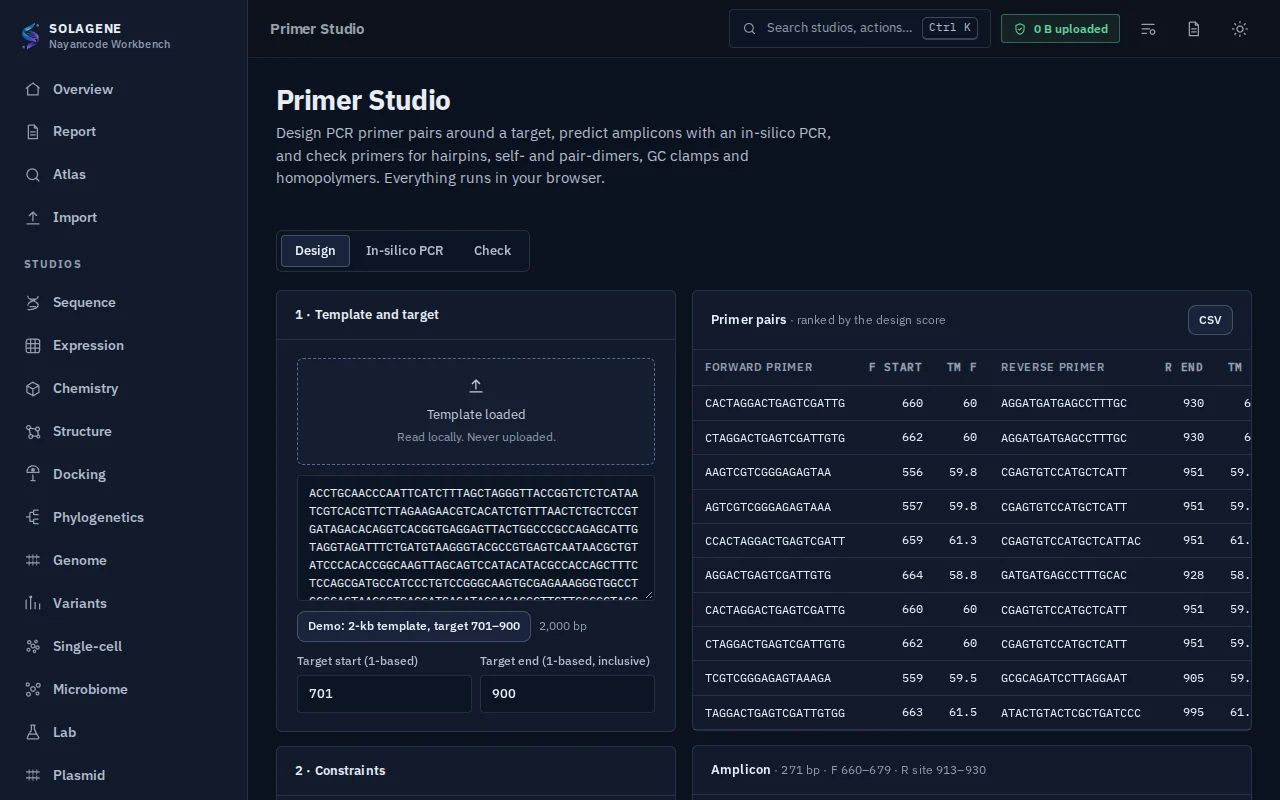
PCR primer-pair design around a target, in-silico PCR against a template, and hairpin, self-dimer and pair-dimer checks with Tm and GC guidance.
Free · your files are not uploaded
Overview
What Primer Design does
Primer Design designs primer pairs around a chosen target in a DNA sequence. It reports Tm, GC content, product size and position, then runs an in-silico PCR so you can see every product the pair would amplify, not only the intended one.
The check tab looks for hairpins, self-dimers, pair-dimers, GC clamps and homopolymer runs. Dimer findings are heuristic run-length checks, not a free-energy model, and the limits are stated in the interface. Sequences stay on your device.
Technical specifications
- Inputs
- FASTA or plain DNA template · Primer sequences (name + sequence or FASTA)
- Outputs
- Ranked primer pairs · Amplicon table from in-silico PCR · Dimer and hairpin report · CSV export
- Engine
- TypeScript kernels
- Platforms
- Chrome, Edge, Firefox and Safari (current versions) · Windows, macOS, Linux and ChromeOS · No installation and no upload; free account for the Workbench
- Limits
- Rules-based design with no genome-wide specificity search; dimer checks are sequence heuristics without free energies. Always BLAST and test primers
- Licence
- Free plan for study and academic research (free account); Lab, Institution and cloud-compute plans for business
Features
Capabilities
Pair design
Primers flanking a target, with Tm, GC and amplicon size.
In-silico PCR
Every product the pair would amplify on the template, with positions.
Dimer checks
Hairpin, self-dimer and pair-dimer runs with risk bands.
Sequence checks
GC clamp and homopolymer warnings alongside the thermodynamic estimates.
Oligo table
Primer sequences and properties ready to copy or export.
Use cases
Who uses it, and for what
- Designing a pair for a cloned insert
- Checking whether a published pair amplifies elsewhere
- Screening primers before ordering
- Teaching why a 3-prime dimer matters
Documentation
Quick start
Open Primer Design
Use the button on this page or the Workbench menu. Nothing to install; works in current Chrome, Edge, Firefox and Safari.
Load data or the demo
Drop in your files (FASTA or plain DNA template, Primer sequences (name + sequence or FASTA)) or load the labelled synthetic demo to explore safely.
Run and inspect
Results appear as interactive figures and tables; each analysis records its parameters and versions.
Export and cite
Export figures and tables, add them to a report, and copy the auto-written methods paragraph.
Learn the methods with Vedicgen
Courses that use Primer Design
Talk to us
Request a demo or ask a question
For classroom use, self-hosted deployments, custom apps or support. We reply within two working days.
Free: Free
Lab: From ₹4,999 per month, billed yearly (US$119 outside India)
Institution: Quoted
Cloud compute & analysis: Quoted