Chemistry & structure
Nayancode Molecular Docking
AutoDock Vina 1.2.7, running in a browser tab.
Molecular docking with AutoDock Vina compiled to WebAssembly: receptor and ligand preparation, box set-up, poses, interactions and small virtual screens.
Free · your files are not uploaded
Overview
What Molecular Docking does
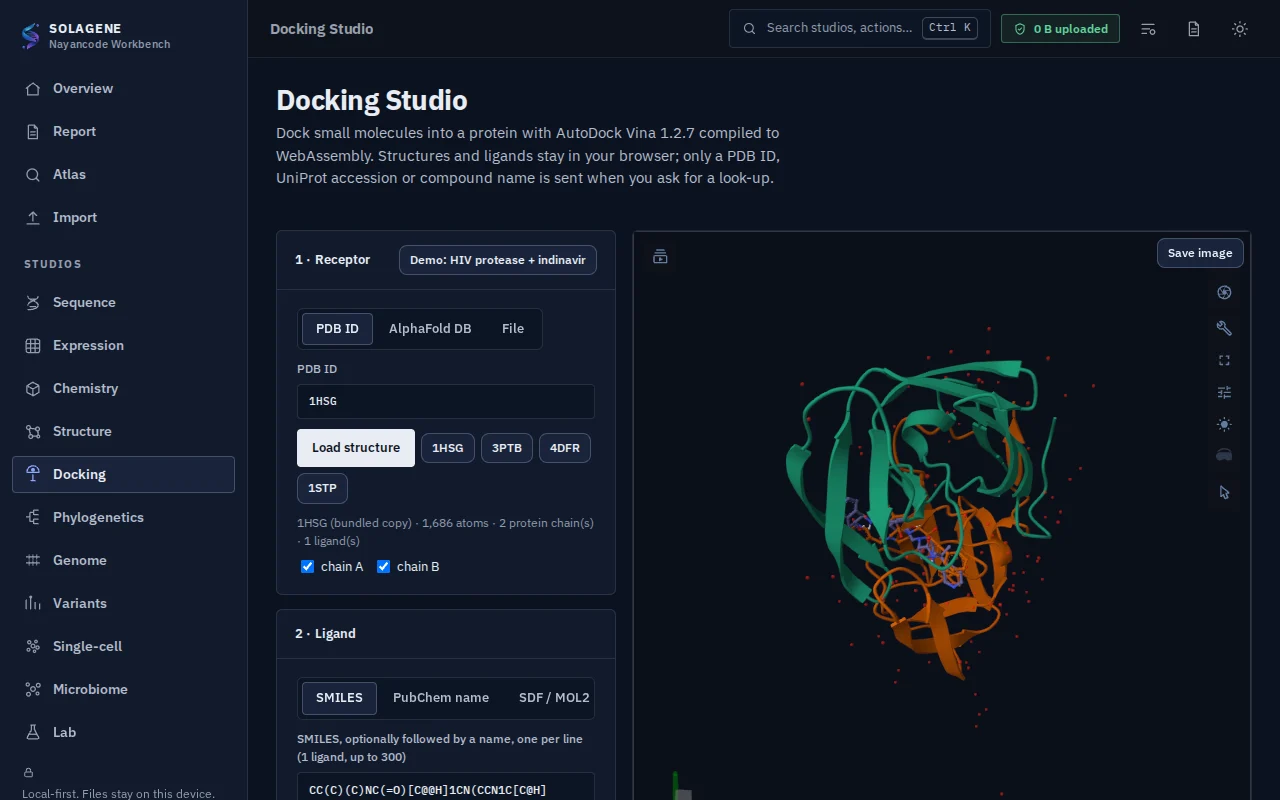
Molecular Docking runs AutoDock Vina 1.2.7, compiled to WebAssembly, inside your browser. Load a receptor from the PDB, AlphaFold DB or a file, give ligands as SMILES, SDF, MOL2 or a PubChem name, and the app prepares both (protonation at pH 7.4, Gasteiger charges, PDBQT, 3-D conformers), sets the box from a co-crystal ligand, residues or coordinates, and docks.
Poses open in a 3-D viewer with an interaction profile (hydrogen bonds, hydrophobic contacts, salt bridges). A redocking benchmark on 42 complexes puts 35.7 % of top poses within 2 Å of the crystal pose, with scores identical to native Vina on the same inputs.
Technical specifications
- Inputs
- PDB ID / AlphaFold DB / PDB or mmCIF file · SMILES, SDF, MOL2 or PubChem name
- Outputs
- Docked poses (PDBQT, SDF) · Affinity table (CSV) · Interaction profile · Docking report (HTML, print to PDF)
- Engine
- AutoDock Vina 1.2.7 (WebAssembly, threads when cross-origin isolated) + RDKit + TypeScript preparation
- Platforms
- Chrome, Edge, Firefox and Safari (current versions) · Windows, macOS, Linux and ChromeOS · No installation and no upload; free account for the Workbench
- Limits
- Rigid receptor, one box up to 40 Å, ligands up to 70 heavy atoms and 20 rotatable bonds, up to 300 compounds per screen; scores are estimates, not binding free energies
- Licence
- Free plan for study and academic research (free account); Lab, Institution and cloud-compute plans for business
Features
Capabilities
Real AutoDock Vina
Vina 1.2.7 in WebAssembly, multi-threaded when the browser allows it; scores match native Vina.
Receptor and ligand preparation
pH 7.4 protonation, Gasteiger charges and PDBQT, from PDB, AlphaFold DB, SMILES, SDF, MOL2 or PubChem.
Pocket finder and box set-up
Find binding pockets automatically (geometric buriedness scan, no ligand needed, works on AlphaFold models), or set the box from a co-crystal ligand, residues or coordinates.
Poses and interactions
3-D pose viewer, affinity table, RMSD to a crystal pose and an interaction profile.
Virtual screens with ranking
Dock up to 300 compounds, rank them by affinity and ligand efficiency, and try a one-click 8-drug example.
Shareable report
Download a self-contained report with ranked results, a chart, methods and citations. Print it to PDF for a thesis or lab meeting.
Validated
Redocking benchmark on 42 complexes, published with the source code.
Use cases
Who uses it, and for what
- Docking a ligand into a target before ordering compounds
- Teaching molecular docking in a classroom without installing software
- Ranking a small set of analogues against a binding site
Documentation
Quick start
Open Molecular Docking
Use the button on this page or the Workbench menu. Nothing to install; works in current Chrome, Edge, Firefox and Safari.
Load data or the demo
Drop in your files (PDB ID / AlphaFold DB / PDB or mmCIF file, SMILES, SDF, MOL2 or PubChem name) or load the labelled synthetic demo to explore safely.
Run and inspect
Results appear as interactive figures and tables; each analysis records its parameters and versions.
Export and cite
Export figures and tables, add them to a report, and copy the auto-written methods paragraph.
Learn the methods with Vedicgen
Courses that use Molecular Docking
Talk to us
Request a demo or ask a question
For classroom use, self-hosted deployments, custom apps or support. We reply within two working days.
Free: Free
Lab: From ₹4,999 per month, billed yearly (US$119 outside India)
Institution: Quoted
Cloud compute & analysis: Quoted